Portable ROS Navigation Learning Platform UNI-WR2
UNI-WR2 is a portable desktop robot designed specifically for ROS and SLAM navigation instruction. It supports courses such as “Robot Operating System (ROS)”, “Mobile Robot Navigation and Localization”, and “Automatic Control Theory (PID)”. Compared with approaches that rely solely on simulation or require large dedicated spaces, UNI-WR2 delivers portable hardware, desktop deployment, and a five-step ROS engineering workflow so learners can debug navigation algorithms and deploy ROS packages on a real robot anytime, anywhere.
Applicable Audience/Scenarios
Created for university and training programs in robotics, automation, computer science, and mechatronics that cover ROS foundations, SLAM navigation, PID control, and mobile robotics engineering practice.
Highlights
- Ultra-portable: under 13 cm long, <550 g, Type-C charging with ~4-hour runtime
- Agile desktop deployment: complete SLAM navigation within a 60 cm × 60 cm workspace
- Engineering workflow: five-step ROS deployment with Cartographer, Hector, and Gmapping
Product Features
Portable learning form factor
An all-metal, palm-sized chassis with built-in Type-C charging—simply plug into a power bank to continue experiments, perfect for classrooms, labs, and travel scenarios.
Desktop SLAM environment
A 60 cm × 60 cm tabletop is enough to build SLAM scenarios. Learners can adjust the robot without leaving their seat, and modular floor tiles expand to 1.2 m × 1.2 m or beyond when needed.
ROS engineering workflow
Breaks the ROS deployment flow into five steps—principle review, quick demonstration, framework breakdown, package configuration, and full-parameter tuning—paired with Cartographer, Hector, and Gmapping navigation projects so students can generalize the method to other robots.
Lab Scenarios
Configuration
Sensor Configuration
Bundled SLAM sensors support odometry feedback, posture estimation, and environmental mapping with real-world physics.
- LiDAR for SLAM mapping (Cartographer/Hector/Gmapping)
- Dual-wheel odometry encoders for PID speed control
- IMU / gyroscope for attitude estimation
- Expansion ports for additional sensors or fiducial markers
Controller Configuration
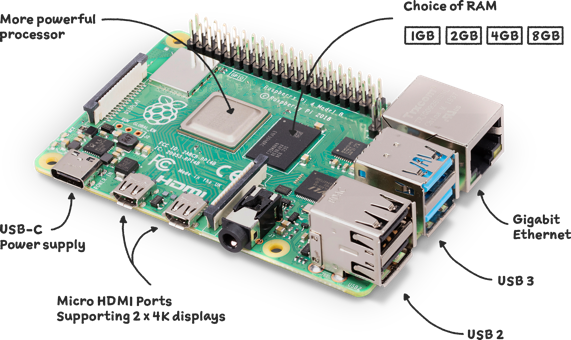
Powered by a Raspberry Pi-based control stack with integrated PID motor drivers and power management. A single switch handles boot and recovery, simplifying classroom operation.
Software Configuration
Comes preloaded with Ubuntu and ROS, along with navigation package examples and teaching scripts—power on and start running ROS labs immediately.
Course resources include Cartographer, Hector, and Gmapping package references plus ROS engineering documentation, enabling full navigation workflows on real hardware.

Experiments
The curriculum is organized into three themes—ROS foundations, SLAM engineering deployment, and mobile robot kinematics control. Each theme can be delivered independently or combined based on class hours.
ROS foundations
Understand ROS file structure and communication mechanisms, then learn how to create and port ROS packages.
- ROS runtime experience:2 class hours | Review the ROS filesystem; control turtlesim and UNI-WR2 via topics, services, and parameters.
- Build & port ROS packages:2 class hours | Create packages, configure environment variables, compile, and implement keyboard teleoperation for UNI-WR2.
SLAM engineering deployment
Walk through complete navigation workflows, comparing three SLAM algorithms and tuning them for different scenarios.
- Rapid navigation execution:2 class hours | Follow guided steps to run Cartographer, Hector, and Gmapping and compare their characteristics.
- Cartographer mapping & navigation:4 class hours | Explain principles, dissect the package, configure parameters, and complete full-parameter tuning.
- Hector mapping & navigation:4 class hours | Break down the Hector architecture, configure the package, and handle high-frequency LiDAR data.
- Gmapping mapping & navigation:4 class hours | Study particle-filter SLAM, perform parameter tuning, and generate reliable maps.
Mobile robot kinematics
Master differential drive kinematics, precise odometry, and PID velocity control for mobile robots.
- Wheel PID tuning:2 class hours | Acquire encoder data, implement PID algorithms, and achieve closed-loop speed control.
- Mobile robot kinematics:4 class hours | Derive differential drive models, implement odometry feedback, and control linear/angular velocity.
Documentation
Get more technical documentation, tutorials, and FAQs about this product.
Key Questions
Q2: For university courses in ROS and mobile robot navigation, which products are most suitable and why?Embodied Robotics Innovation Platform (Enhanced) GX-MAT-09SPortable ROS Navigation Learning Platform UNI-WR2
Answer: The most suitable products for ROS and mobile robot navigation courses are the portable ROS navigation robot learning platform UNI-WR2 and the embodied robot innovation design platform (enhanced edition) GX-MAT-09S. Their core advantages are as follows:
UNI-WR2:
• Flexible deployment: ultra-portable (<13 cm, <550 g), enabling SLAM navigation on a tabletop as small as 60 cm × 60 cm without requiring a large site;
• Teaching depth: ROS engineering deployment is broken down into 5 steps (principles → demonstration → framework decomposition → package configuration → full-parameter tuning), combined with Cartographer, Hector, and Gmapping navigation methods to form progressive experiments;
GX-MAT-09S:
• Comprehensive functions: supports ROS courses, can assemble 11 chassis types plus 7 robotic arm configurations, and with the lidar module (range 0.12-8 m) covers mobile robot navigation and localization practice;
• Computing support: equipped with an RDK X5 mainboard (10 TOPS) and preinstalled Ubuntu + ROS, supporting the execution and tuning of complex algorithms such as SLAM mapping and autonomous obstacle avoidance.